The board
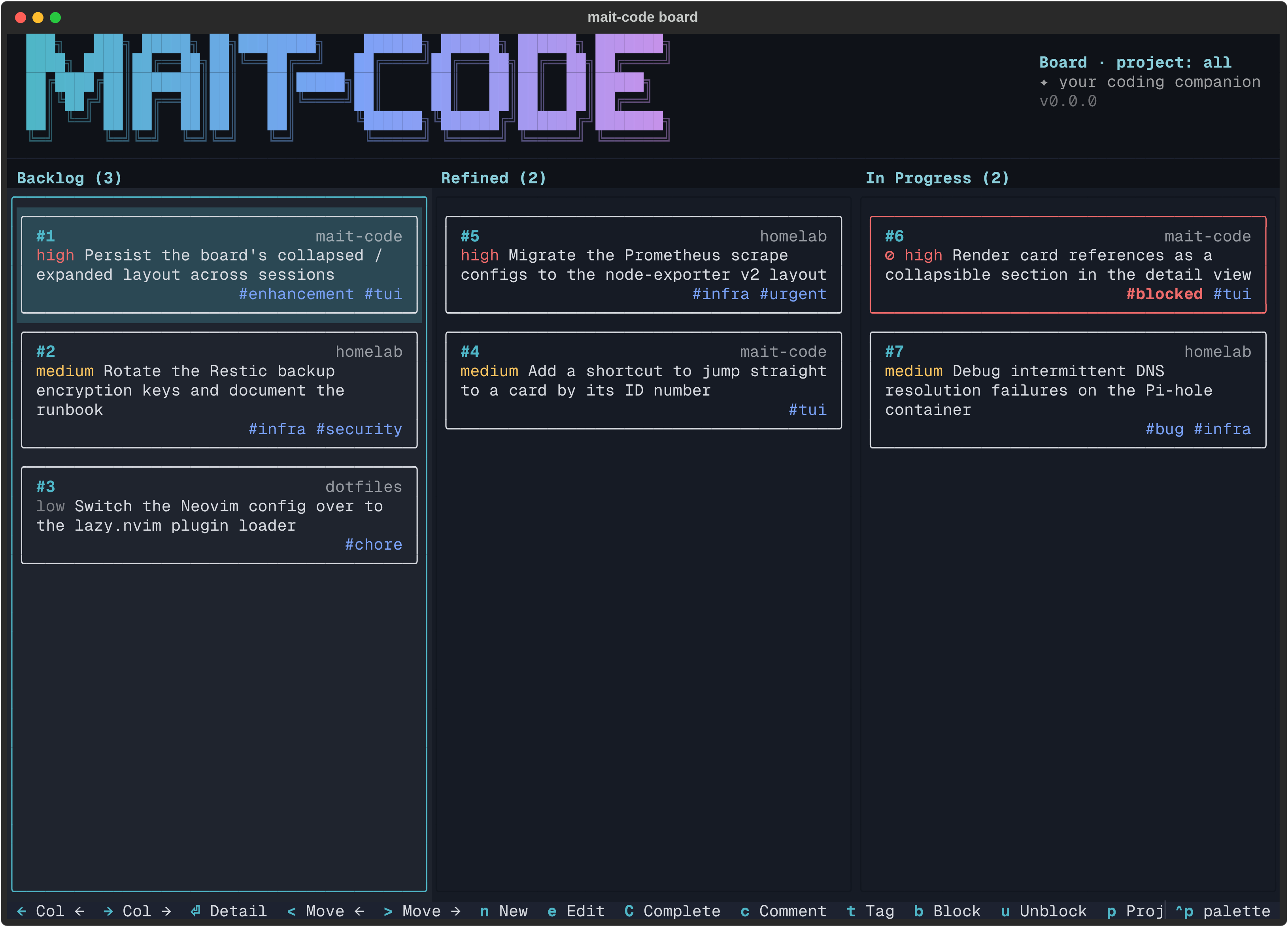
The board is a lightweight kanban that lives alongside your code. Cards capture work — a bug, an idea, a half-formed feature — and flow through fixed columns as you and Claude turn them into shipped changes. It is the spine of a reactive way of working: instead of writing a long plan up front, you jot a card, refine it when you get to it, and let Claude pick it up and do the work in the same session.
Why use it
A plan written before you understand the problem is a guess. The board lets you defer that guess: park a rough idea in Backlog, sharpen it into a crisp Refined card only when you're about to act on it, and keep the act of deciding what to do separate from the act of doing it. The payoff is a tighter, more interactive loop — less ceremony, more momentum — and a durable record of what was done and why, because every completed card carries a handoff summary.
The board spans every project. One store, filtered by project, so an idea you have while working on repo A doesn't get lost when you switch to repo B.
The mental model
The board is manually driven, and Claude is the worker. There is no background dispatcher quietly shuffling cards — nothing moves unless you ask for it. You decide what gets refined, what gets picked up, and what gets completed; Claude does the refining and the building when you say so, and never moves, completes, or archives a card on its own.
That distinction matters. The board isn't a notification system nagging you about work — it's a shared surface the two of you reason over together.
The lifecycle
Cards flow through five fixed columns, with one hidden side-state:
flowchart LR
    B[Backlog] --> R[Refined] --> P[In Progress] --> V[In Review] --> D[Done]
    D -. archive .-> A[Archived]
P -. park .-> A| Column | Meaning |
|---|---|
| Backlog | Raw, unrefined ideas. Where new cards land. |
| Refined | Has a clear description and acceptance criteria. Ready to be picked up. |
| In Progress | Actively being worked in the current session. |
| In Review | Work finished and waiting on review, usually an open pull request. Hidden while empty. Press v to show it anyway; it always shows while it holds a card. |
| Done | Finished, with a completion summary. Hidden by default — press d to show. |
| Archived | Parked out of sight without deleting. Hidden by default — press a to show. |
You don't have to march cards through every column in order — you can move a card
anywhere via the CLI — but backlog → refined → in_progress → in_review → done
is the intended grain, and following it is what makes the workflow pay off.
Blocked is a tag, not a column
A blocked card keeps its real column — a blocked refined card stays in
Refined. Blocking just attaches a blocked tag (and records the reason
as a comment), so you never lose track of where a card was when it stalled.
blocked is just the most common of the free-form tags any card can carry.
Collapsed for work, expanded for review
By default the board shows only the live columns — Backlog, Refined, and In Progress. This collapsed view is the working layout: it keeps the three columns you actually act on wide and uncluttered, with finished and parked work tucked out of sight so it can't pull your attention.
In Review joins them whenever a card is waiting on review, so work
waiting on a pull request never disappears from view. Press v to show it while
it's empty too.
Press d and a to reveal Done and Archived — the full six-column view:
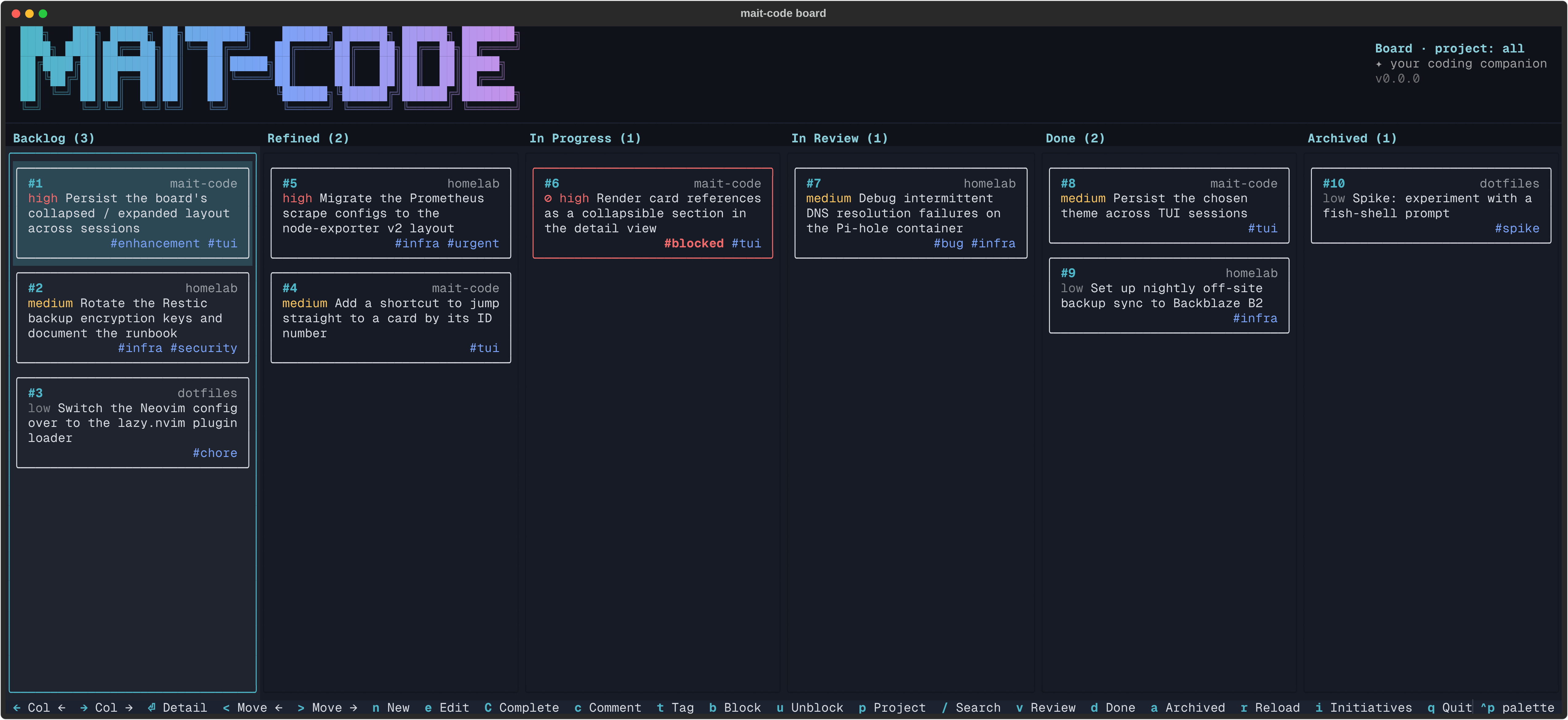
This expanded layout is for admin and reflection, not for getting work done:
reviewing what's shipped, re-reading completion summaries, sweeping stale cards
into the archive, and taking stock of how much has moved. Step back into it when
you want the whole picture; collapse it again (d, a) when you want to get back
to the flow.
Two ways in
There are two ways to drive the board, and they share the same store — changes in one show up in the other.
The TUI
Open the interactive board with:
This is a full-screen Textual app: arrow keys
to move around, single-key shortcuts to act on cards, Ctrl+P for the command
palette, and live theming. It's the best way to see the state of your work at a
glance and to do bulk triage by hand.
When you're not on a terminal that supports it (e.g. piping output, or in CI),
mait-code board falls back to a read-only text render of every project's board
(with --initiatives, the open epics and their progress).
The conversation
The more transformative path is to drive the board through Claude. Just talk:
- "What's on the board?" — Claude shows you the current cards.
- "Refine card 12." — Claude drafts a description and acceptance criteria, shows them to you for approval, then moves the card to Refined.
- "Pick up the next refined card." — Claude claims the highest-priority refined
card that's ready (not tagged
blocked, not waiting on an unfinished card that blocks it), moves it to In Progress, reads its acceptance criteria, and gets to work — all in the same session. - "Continue card 12." — in a fresh session, Claude binds itself to the card, whichever open column it's in (see parallel sessions), and carries on.
- "That's done." — Claude completes the card with a summary of what changed.
This is the loop that replaces up-front planning: refine just-in-time, pick up, build, complete, repeat.
A session, end to end
A typical board-driven session looks like this:
- Capture. Something occurs to you mid-task — "the toast colours wash out on the ember theme." You say so; Claude offers to add a card, you confirm, and it lands in Backlog. You don't break your flow to act on it.
- Refine. Later, you're ready to tackle it: "refine the toast-contrast card." Claude drafts a description and acceptance criteria and shows them to you. You tweak the criteria, approve, and the card moves to Refined.
- Pick up. "Take the next refined card." Claude claims it — moving it to In Progress — reads the acceptance criteria you both agreed on, and starts implementing against them.
- Track. As work progresses, comments and references accrue on the card: a
link to the PR, a note about a tricky edge case. If something stalls, "block
it — waiting on the upstream fix" tags it
blockedin place. - Review. When the work is up as a pull request: "park it in review, PR is #42." The card moves to In Review with the PR attached as a reference, so the board shows it as finished but not merged.
- Complete. Once it merges: "complete it, summary: re-derived chip colours from the theme palette." The card moves to Done, stamped with the time and the handoff summary.
The acceptance criteria written at step 2 are the contract for steps 3 to 6 — which is exactly why refining before picking up is worth the small ceremony.
Parallel sessions
You may well run several Claude Code sessions against one project at once: two cards being built side by side, plus a third session that's only poking at a bug. The columns then hold more than any one session is doing, so each card also records which sessions are working on it. A binding means "this session is working on this card", whichever open column the card is in, so a session refining a card is bound to it as much as one building it.
- Binding is automatic when you start work. Moving a card into
In Progress from inside a session (picking up the next card, or
move N in_progress) binds it to that session. "Continue card 12" in a new session runsbind 12, which works on any card that isn't Done or Archived. A card can carry several sessions; a session with nothing bound (the bug-poking one) simply has none. - Release is automatic too. A card entering In Review (handed off) or
closing (Done, Archived, or promoted to an epic) drops all its
bindings, whichever verb moves it. Moves between Backlog, Refined and
In Progress, refining included, keep them. To work through PR feedback,
bindthe In Review card again. - Held cards aren't handed out.
nextandlist --readypass over a card that another live session is bound to, so a parallel session can't claim a card someone else is refining. - Bindings stay honest. Each records the Claude Code process serving the
session, and only counts while that process is alive, so a closed session
drops out without any clean-up. A resumed session keeps its binding, and so
does a
/clear: the session-start hook moves the binding to the new session. A closed session's binding is kept for two weeks after it was last bound or resumed, in case it's resumed again, then removed at the next session start. - "The card I'm on" is
mc-tool-board list --mine, across every project.showlists a card's sessions, and each session's start-up context names its cards.
Bindings rely on the CLAUDE_CODE_SESSION_ID and CLAUDE_PID variables Claude
Code exports to its tools and hooks. Outside Claude Code, nothing binds and the
board behaves exactly as before.
Playbook runs
A playbook is a skill that drives a card through a fixed series of steps — refine, review, implement, raise a PR. The board records where a card is in such a run, so you can see it at a glance:
mc-tool-board run start 12 --playbook work --steps "Refine" "Design review" "Implement"
mc-tool-board run step 12 1 done
mc-tool-board run step 12 "Design review" skipped --reason "small change"
mc-tool-board run step 12 3 in_progress
mc-tool-board run show 12
mc-tool-board run end 12
- Steps come from the playbook. The board stores the names it's given and doesn't interpret them, so a playbook can change its steps freely. A step is addressed by its position or its exact name.
- Each step is
pending,in_progress,done,skippedorpaused. A skip needs a reason and adds a comment to the card; a pause may carry one. Only one step is in progress at a time, and any step can be redone. - The current step is the one in progress, or else the first paused one.
showand the TUI's card screen mark it, andsummary --json --sessioncarries it on each bound card for status surfaces such as the companion mod. - A run ends when the playbook says so (
run end), or when the card is completed, archived or promoted to an epic. Finishing every step doesn't end it, so the final state stays visible until the playbook has reported on it. Starting a new run on a card with an open one needs--replace. Ended runs are kept:run show N --alllists every run on the card, newest first, each ended one with its end time. An ended run has no current step, even if it ended with a step still in progress.
/work N is the playbook mait-code ships: it takes a card from refinement to
a raised pull request in eight steps (refine, design-review, implement,
comment-audit, commit-review, address-findings, tests, raise-pr),
recording each one here. See the skills reference.
Epics and dependencies
Columns say where each card stands; they don't say how cards relate. Two relationships fill that gap, and both cross projects freely — the board is one store, so a homelab card can wait on a mait-code card.
Epics
An epic is an umbrella card for an initiative — a roadmap, say, whose work spreads across several repos. Member cards name it as their parent, and the epic tracks their progress:
mc-tool-board add "Voice assistant" --epic          # a new epic
mc-tool-board epic promote 170                      # …or promote an existing umbrella card
mc-tool-board add "Wake-word daemon" --parent 170   # a member
mc-tool-board edit 141 --parent 170                 # join an existing card (--parent none leaves)
mc-tool-board epic list                             # 170 Voice assistant — In Progress — 3/7 done · 1 waiting
mc-tool-board epic show 170                         # its members, column by column
- Epics stay off the board. An epic belongs to no project — it carries the
reserved project
@epic— so it never shows in a project's columns, inlist, in the counts or innext. It is never worked directly; its members are. - One level, one epic. A card has at most one epic, and epics have no parent. If a card seems to belong to two initiatives, it is two cards.
- They live in the Initiatives view. In the TUI, i swaps the kanban for every open epic with its progress, beside a table of the highlighted epic's members — see Initiatives view.
- Status by hand. Move or complete an epic like any card. When finishing or archiving its last open member, the CLI notes "epic #170 has no open members" — a reminder, never an automatic move.
- New cards from old keep their epic. A card split off during refinement,
or a follow-up spotted while working, is added with
--from: it joins the origin's epic and gets afrom→#Nreference, so you can trace it back.--parentstill wins —--parent nonekeeps it out of any epic.
Dependencies
link A blocks B records that B can't start until A is done:
mc-tool-board link 141 blocks 147
mc-tool-board show 147        # blocked by: #141 Wake-word daemon (Refined)
mc-tool-board unlink 141 blocks 147
nextrespects it.next(andnext --claim) hands out only ready cards: refined, not taggedblocked, not waiting on an unfinished blocker, and not held by another live session.list --readylists them all;next --epic 170picks the top ready member of one initiative, whichever project it sits in.- Waiting shows up where you look.
listrows endwaiting on #141, and on the TUI's kanban a waiting card wears the blocked border with awaiting on #141line.showlists every blocker with its status — finished ones too, so a link never silently disappears — and what the card unblocks. - Done or dropped both release. A blocker that reaches Done frees the
cards behind it. So does one that's archived — the work was dropped — but
showadds a nudge to look again, since the waiting card probably needs it. - No loops. A link that would close a cycle is refused, naming it:
#41 blocks #47 would close a loop: #41 → #47 → #52 → #41. - Links or the tag? Link when the blocker is another card. Keep the
blockedtag for blockers outside the board — an upstream fix, a person, a decision.
Anatomy of a card
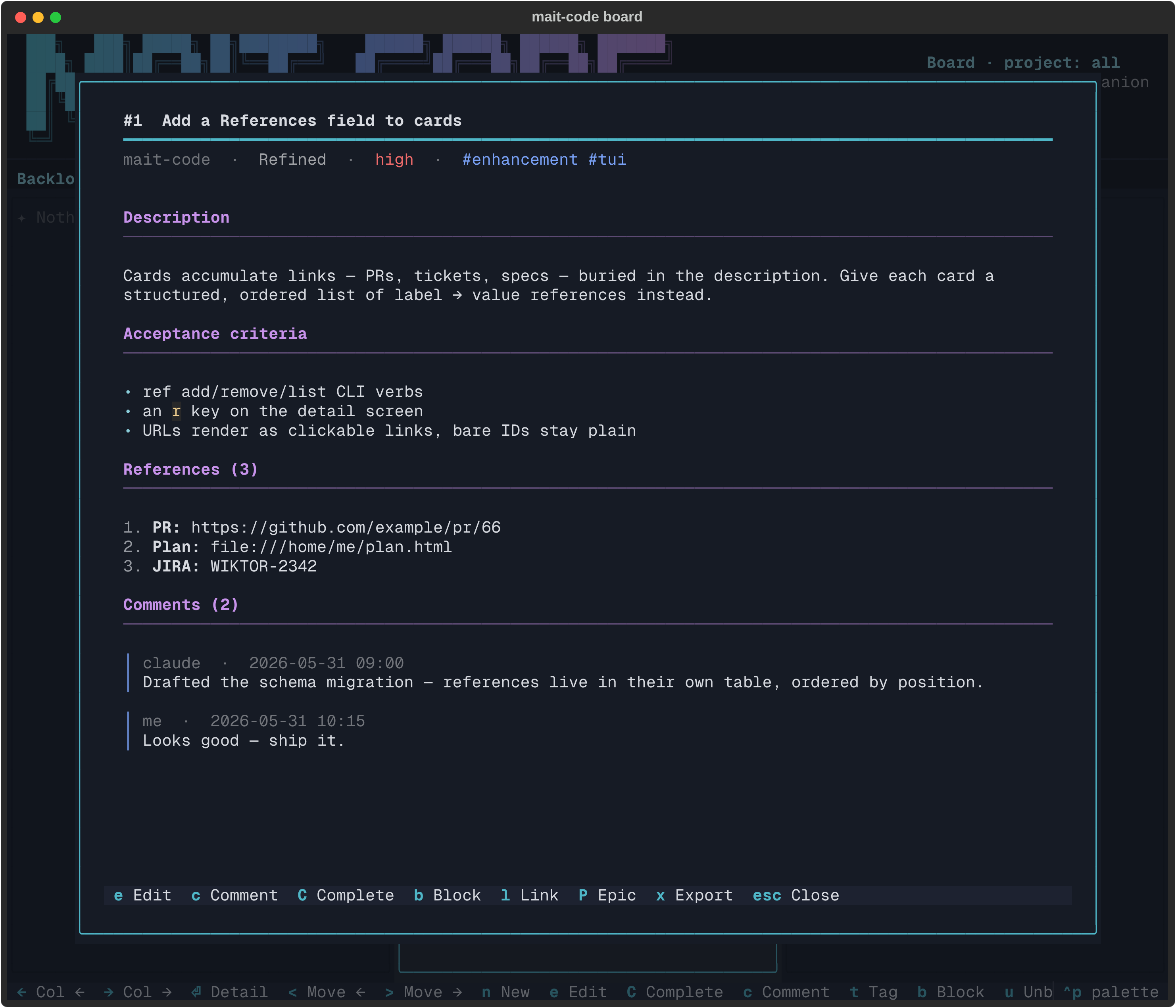
The title and the meta line beneath it (project · status · priority · tags) are pinned above the scroll: as you page through a long description, acceptance criteria and comment thread, they stay put — a constant reference to which card you're reading.
Every card carries:
| Field | Notes |
|---|---|
| Title | Required. The one-line summary. |
| Project | Required. Which repo (or idea) the card belongs to. Change it later with edit --project or the TUI edit form. |
| Priority | low, medium (default), or high. Drives pick-up order. |
| Description | The "what and why". Renders markdown, and plain text works just as well. |
| Acceptance criteria | The contract for done, usually set when refining. Renders markdown too. |
| Testing strategy | Not a field but a section at the end of the description: a paragraph reading exactly **Testing strategy**, then a bullet per chosen strategy. The board skill writes it when it refines a card, choosing from your testing_strategies.md; /work reads it at its test step. Cards refined in the TUI, with mc-tool-board refine or through the remote API don't get one automatically. |
| References | An ordered list of label → value links — a PR, a ticket, a file, a spec. Kept out of the description so they stay tidy and clickable. |
| Tags | Free-form labels that ride alongside status (blocked, urgent, …). |
| Comments | A threaded log — your notes and Claude's, each timestamped. |
| Epic | The epic the card belongs to, if any — shown as epic: in show. |
| Blocked by / blocks | Its dependency links in each direction; show and list mark the blockers it's still waiting on. |
| Sessions | The live Claude Code sessions working on the card, in any open column (see parallel sessions). Listed by show and in --json output; left out of exports. |
| Run | The open playbook run, if any: its playbook, start time and each step's status, the current step marked. Shown by show, the card screen and exports, and as run in --json output. |
| Created by | Only on cards raised through the remote API: the client that created it, shown as via <client> on the meta line and as created by: in show. Locally created cards have none. |
| Completion summary | The handoff note recorded when the card reaches Done. Renders markdown. |
References deserve a mention: they're a recent addition for keeping a card's
links structured rather than buried in prose. A value that looks like a URL
(https://…, file://…) renders as a clickable link in the TUI; a bare
identifier like JIRA-2342 stays as plain text. Manage them in a card's edit
form (press e on the detail screen), or with the ref CLI commands.
Markdown in the body
The three free-text body fields — Description, Acceptance criteria and
Completion summary — render markdown in the detail view. Headings, emphasis,
bullet and ordered lists (including nested ones), blockquotes, tables, inline
code and fenced code blocks (with syntax highlighting) all display formatted
rather than as raw #, ** and -:
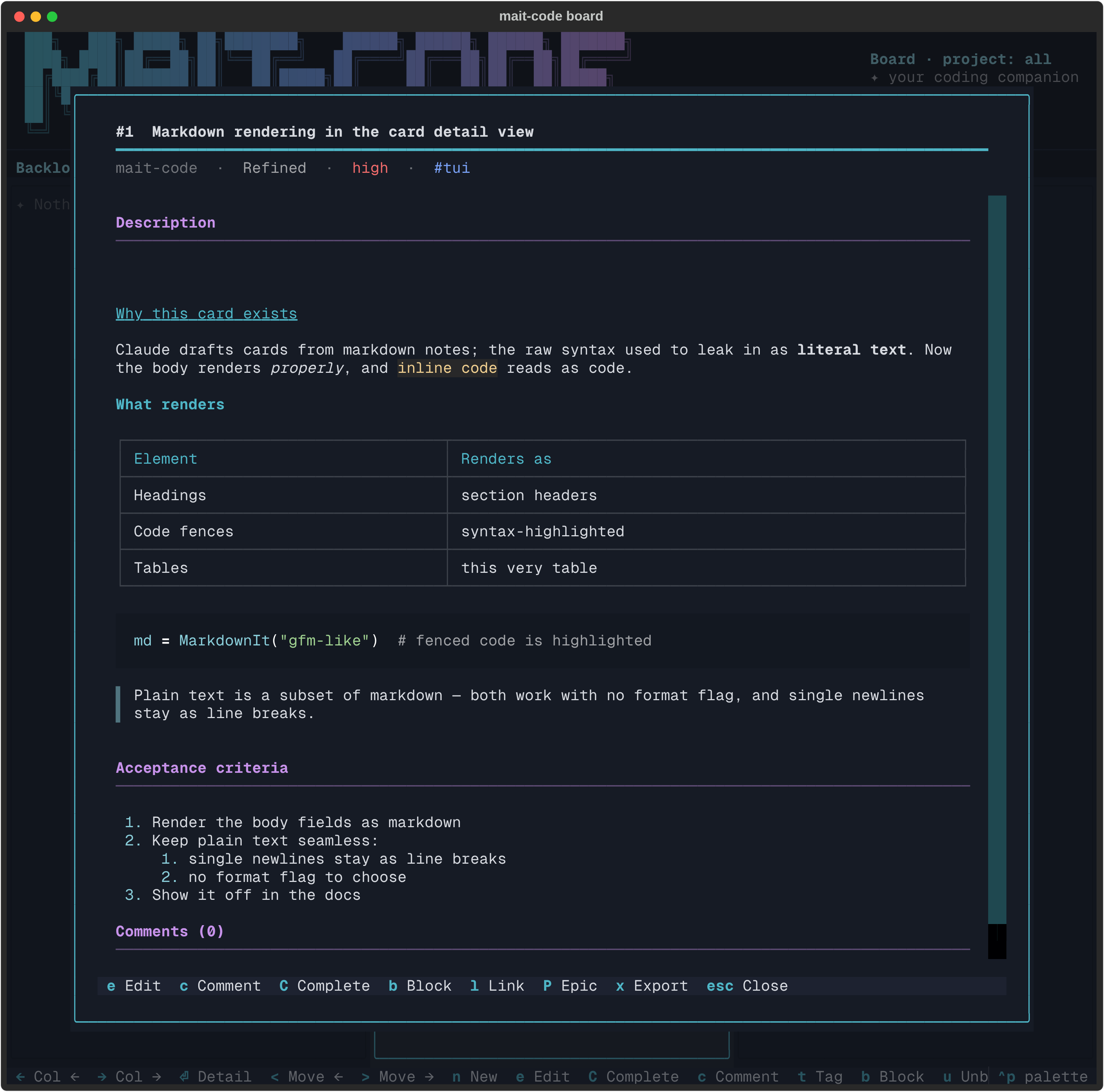
The key thing is that there's no format to choose. Plain text and markdown share the same field, and both render correctly — because plain text is valid markdown. Single newlines are kept as line breaks, so a plain list of notes lays out the way you typed it instead of reflowing into one paragraph. You can paste a markdown doc Claude drafted, or jot a few plain lines, and either reads right. The edit form (e) takes the raw text either way — what you type is what's stored; the formatting only appears in the view.
Links in the body ([label](url)) render as styled text but aren't clickable —
References stays the one place for links you can follow.
TUI reference
Board view
| Key | Action |
|---|---|
| ← / → | Focus the previous / next column |
| ↑ / ↓ | Highlight the previous / next card |
| 1–6 | Jump straight to the nth visible column (hidden columns are skipped, so the numbers shift as In Review, Done and Archived come and go) |
| Enter | Open the highlighted card's detail screen |
| n | New card (the project is pre-filled from the active filter, else left for you to choose) |
| e | Edit the highlighted card |
| c | Add a comment |
| C | Complete the card (prompts for a summary) |
| t | Add / remove a tag |
| b / u | Block / unblock |
| < / > | Move the card left / right through the flow |
| p | Filter by project (dropdown picker) |
| / | Search cards by title |
| v | Toggle the In Review column (it stays visible while it holds cards) |
| d | Toggle the Done column |
| a | Toggle the Archived pane |
| r | Reload the board from disk (it also reloads on its own when the store changes underneath it) |
| i | Switch to the Initiatives view |
| Ctrl+P | Command palette (incl. theme switching) |
| ? | Key cheat-sheet |
| q / Esc | Quit |
A card that can't start yet wears a red border and a leading ⊘, whichever the
reason: a #blocked tag, or a waiting on #N line naming the unfinished cards
it depends on. A card that is both shows both.
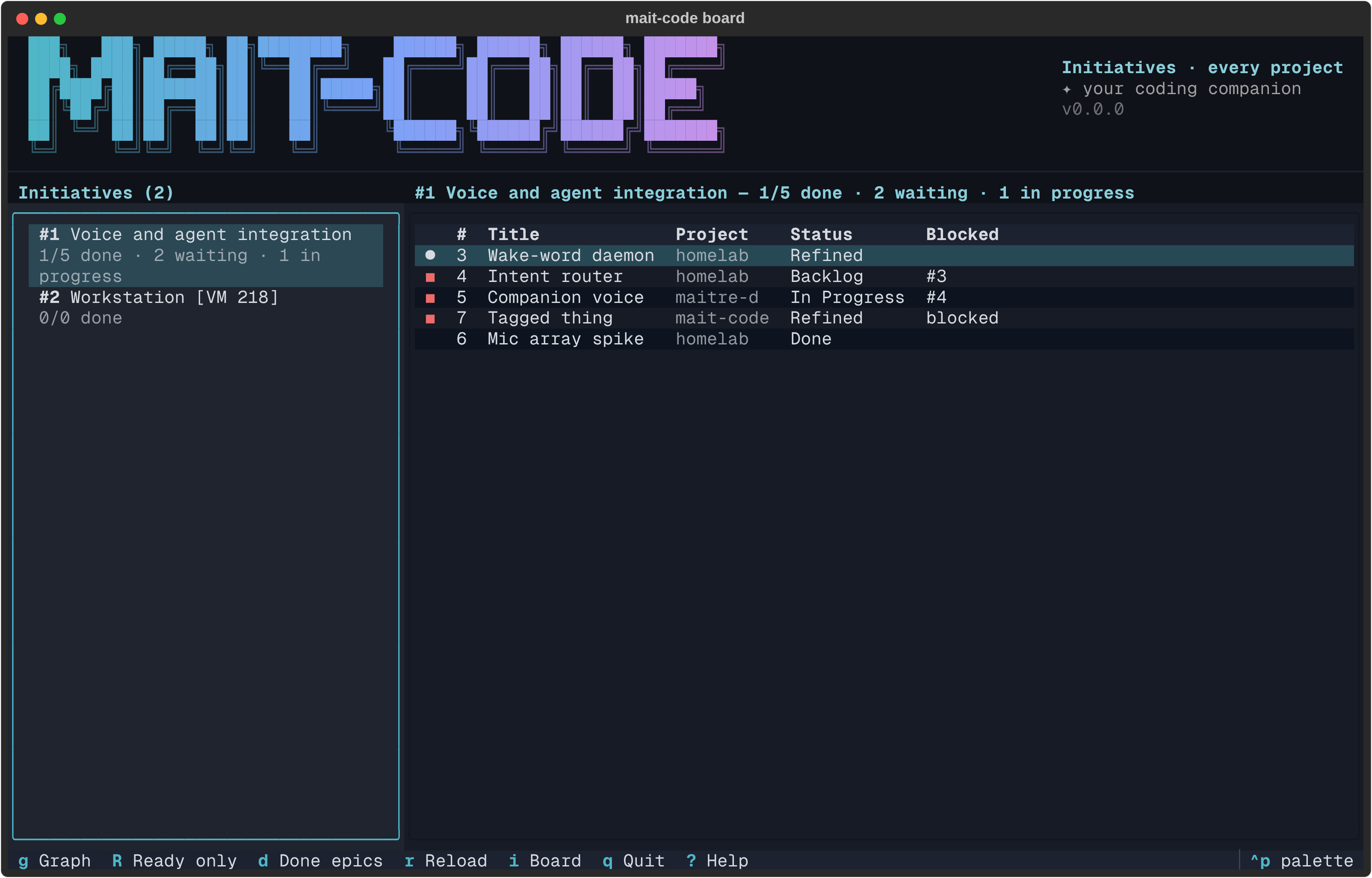
Initiatives view
Every open epic on the left, with its progress
(3/7 done · 1 waiting · 2 in progress); on the right, the highlighted epic's
members from every project — the board's project and search filters don't apply
here. Members sort by what can move: ready (●) first, then In Progress
and In Review, then anything held up (◼, with what it's waiting on), then the
rest of Refined and Backlog, Done last. Archived members are left out.
| Key | Action |
|---|---|
| ↑ / ↓ | Move through the epics or members |
| ← / → | Focus the epics / the members (or the diagram, whose arrow keys then scroll it) |
| Enter | Open the highlighted epic or member in the card detail screen |
| g | Swap the member table for the epic's dependency diagram, and back |
| R | Show only ready members — exactly what next --epic N would choose from (table only) |
| d | Include done epics |
| r | Reload (it also follows changes made elsewhere, like the board) |
| i | Back to the kanban |
| Esc | Leave the board (opened from the hub, back to the hub) |
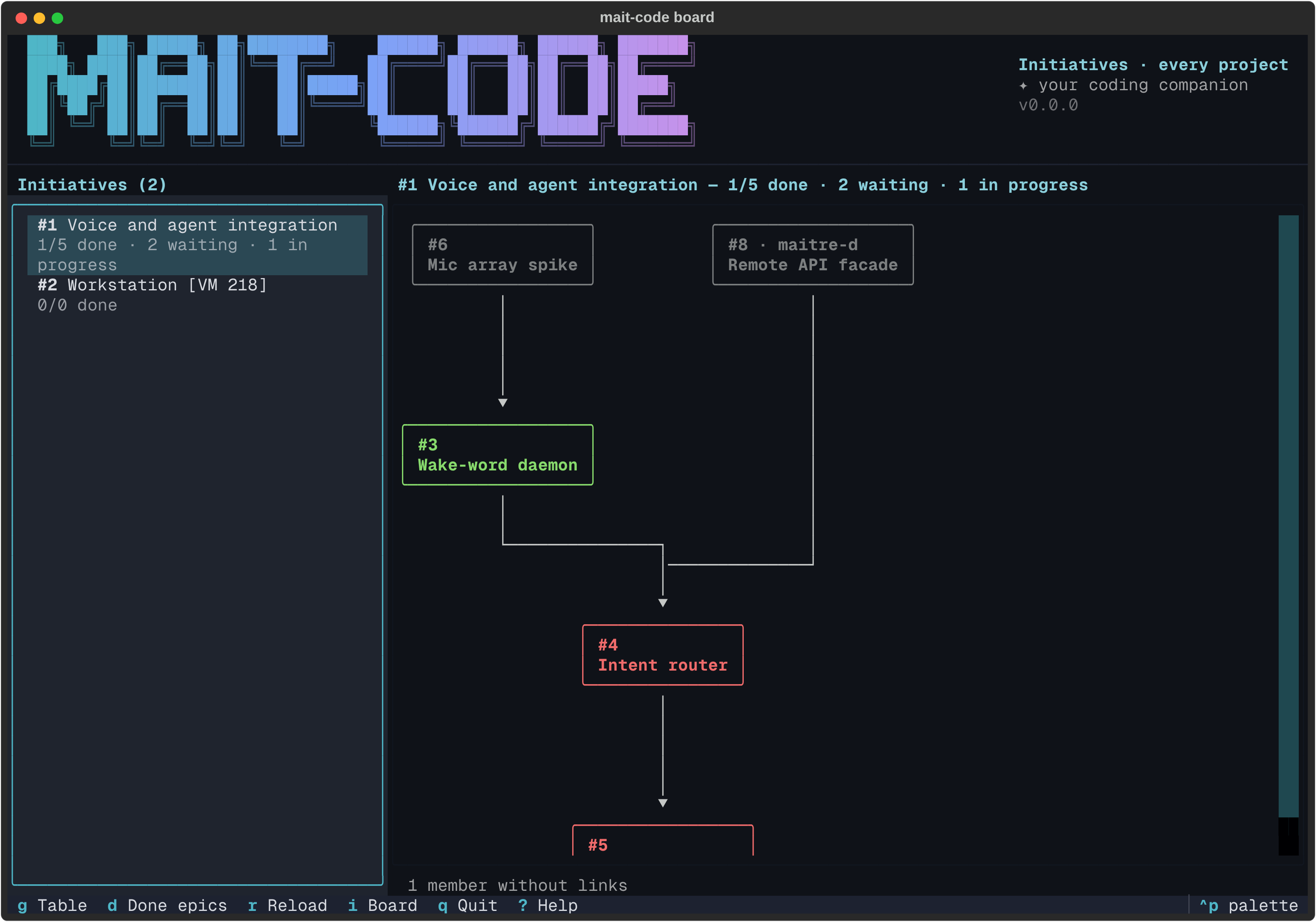
The dependency diagram (g) draws the epic's blocks links top-down,
blockers above the cards they hold up. Each box reads #id and the title,
coloured by state: green when ready, red while blocked or waiting, the accent
hue in progress or review, dimmed once done. Cards outside the epic that a
member links to appear as dimmed stubs labelled with their project. Members
with no links aren't drawn — a line under the diagram counts them — and a
diagram taller or wider than the pane scrolls. It's read-only: open cards from
the table.
Card detail screen
| Key | Action |
|---|---|
| e | Enter edit mode |
| Ctrl+S | Save changes (in edit mode) |
| Esc | Close the screen / cancel an edit |
| c | Add a comment |
| C | Complete the card |
| b / u | Block / unblock |
| l | Add a blocks link (this card blocks another, or is blocked by one) or remove an existing one |
| P | Set or clear the card's epic |
| x | Export the card to markdown (prompts for the path, pre-filled with card-N.md in your home directory, then in whichever directory you last exported to); an epic exports with its members |
The edit form (e) is the single place a card is changed: title,
project, priority, status, tags, references, description and
acceptance criteria all live on one form. The project field completes known
project names as you type (→ accepts) and takes a new one just as
well; moving a card out of the active project filter drops it from the board,
with a toast naming where it went. Tags, references and status are a working copy —
Save (Ctrl+S) applies them all at once, and Esc
discards every pending change. Block / unblock stay outside the form (they carry
a reason comment a plain tag can't), so the form's tag editor leaves the
blocked tag alone.
A Relationships section lists the card's epic, every card it's blocked by (each marked waiting, done or ⚠ archived) and the cards it unblocks; it's left out when there are none. A link that would close a loop, or any other refused change, shows as an error toast naming the reason and changes nothing. Opened on an epic, the screen shows its progress where a card's project would be; its project is fixed, and linking, the epic picker, block / unblock and tags don't apply.
Theming
The board ships several house themes (mait-dark, mait-ember,
mait-aurora, mait-bubblegum, mait-syntax) plus Textual's built-ins.
Switch via Ctrl+P → search theme. Your choice
persists across sessions.
CLI reference
The TUI is a front-end over the mc-tool-board command, which you (or Claude)
can call directly. The same store backs both.
# View
mc-tool-board list [--all] [--status STATUS] [--archived] [--search/-q TEXT] [--mine | --session ID] [--epic ID] [--ready] [--json]
mc-tool-board show ID [--json]
mc-tool-board summary [--all] [--project PROJECT] [--json [--session ID]]   # --session adds bound/in-review cards + inbox count

# Create & edit
mc-tool-board add "<title>" [--description ...] [--priority low|medium|high] [--project ... | --epic] [--parent EPIC|none] [--from ID] [--json]
mc-tool-board edit ID [--title ...] [--description ...] [--priority ...] [--acceptance ...] [--project ...] [--parent EPIC|none] [--json]
mc-tool-board comment ID "<note>" [--author me|claude] [--json]

# Flow
mc-tool-board refine ID [--description ...] [--acceptance ...] [--json]   # → refined
mc-tool-board next [--project ... | --epic ID] [--claim] [--json]         # top ready card; --claim → in_progress
mc-tool-board review ID [--pr <url>] [--json]                             # → in_review; --pr adds a PR reference
mc-tool-board complete ID --summary "<what was done>" [--json]            # → done
mc-tool-board move ID <backlog|refined|in_progress|in_review|done|archived> [--json]
mc-tool-board archive ID [--json]                                         # hide without deleting
mc-tool-board remove ID [--json]                                          # permanent delete

# Playbook runs
mc-tool-board run start ID --playbook NAME --steps "A" "B" ... [--replace] [--json]
mc-tool-board run step ID <position|name> <pending|in_progress|done|skipped|paused> [--reason ...] [--json]
mc-tool-board run end ID [--json]
mc-tool-board run show ID [--json]                                        # the open run, or null
mc-tool-board run show ID --all [--json]                                  # every run, newest first, or []

# Sessions (any open card; defaults come from $CLAUDE_CODE_SESSION_ID / $CLAUDE_PID)
mc-tool-board bind ID [--session ID --pid PID] [--json]                  # bind a session (--session needs --pid)
mc-tool-board unbind ID [--session ID] [--json]                           # drop a session's binding

# Tags & blocking
mc-tool-board tag ID <tag> [--json]      /  mc-tool-board untag ID <tag> [--json]
mc-tool-board block ID "<reason>" [--json]  /  mc-tool-board unblock ID [--json]

# Epics & dependencies
mc-tool-board epic list [--done] [--json]                                 # epics with member progress
mc-tool-board epic show ID [--json]                                       # an epic and its members
mc-tool-board epic promote ID [--json]                                    # turn a card into an epic
mc-tool-board link A blocks B [--json]   /  mc-tool-board unlink A blocks B [--json]

# References
mc-tool-board ref add ID <label> <value> [--json]
mc-tool-board ref remove ID <position> [--json]
mc-tool-board ref list ID [--json]

# Export
mc-tool-board export ID [--format markdown|json] [--out FILE]    # one card, full fidelity
mc-tool-board export --epic ID [--format ...] [--out FILE]       # an epic and its members
mc-tool-board export [--format ...] [--out FILE] \
    [--all | --project ...] [--status STATUS] [--archived] [--search TEXT]   # whole board
--json gives machine-readable output everywhere — handy for scripting or for
Claude to consume. On the read commands it emits what they list; on mutating
commands it emits the affected card after the mutation (the show --json
shape, comments included), so e.g. add --json hands a script the new card's
id without parsing prose. remove --json emits the card as it was before
deletion.
export renders a card — or a whole board listing, grouped by column — as a
portable document. Markdown embeds the stored description, acceptance criteria
and completion summary verbatim, so what you wrote round-trips unchanged; JSON
is full fidelity (tags, references and comments included, matching the
show --json shape, minus live session bindings). Output goes to stdout unless --out FILE is given. The
board-wide form takes the same filters as list and, like the board, leaves
epics out — export --epic ID exports one with all its members.
Tips for getting the most from it
- Capture freely, refine sparingly. Backlog is cheap; a card you'll never act on costs nothing. Only spend effort refining when you're about to do the work — that's the whole point of deferring the plan.
- Write acceptance criteria you'd accept. They're the contract Claude builds against and the bar for completion. Vague criteria, vague results.
- Let Claude claim the next card.
pick up the next refined cardrespects priority then age and skips blocked cards, so the board decides what's most important — you don't have to. - Use references, not description links. A
PR → https://…reference stays clickable and structured; the same URL pasted into the description is just text. - Complete with a real summary. The handoff note is what makes Done a record rather than a graveyard — future-you (and Claude) will read it.
- Block in place. When work stalls, block it rather than dragging it back to Backlog. You keep the context of where it was and why it stopped.