The board
The board is a lightweight kanban that lives alongside your code. Cards capture work — a bug, an idea, a half-formed feature — and flow through fixed columns as you and Claude turn them into shipped changes. It is the spine of a reactive way of working: instead of writing a long plan up front, you jot a card, refine it when you get to it, and let Claude pick it up and do the work in the same session.
Why use it
A plan written before you understand the problem is a guess. The board lets you defer that guess: park a rough idea in Backlog, sharpen it into a crisp Refined card only when you're about to act on it, and keep the act of deciding what to do separate from the act of doing it. The payoff is a tighter, more interactive loop — less ceremony, more momentum — and a durable record of what was done and why, because every completed card carries a handoff summary.
The board spans every project. One store, filtered by project, so an idea you have while working on repo A doesn't get lost when you switch to repo B.
The mental model
The board is manually driven, and Claude is the worker. There is no background dispatcher quietly shuffling cards — nothing moves unless you ask for it. You decide what gets refined, what gets picked up, and what gets completed; Claude does the refining and the building when you say so, and never moves, completes, or archives a card on its own.
That distinction matters. The board isn't a notification system nagging you about work — it's a shared surface the two of you reason over together.
The lifecycle
Cards flow through five fixed columns, with one hidden side-state:
flowchart LR
    B[Backlog] --> R[Refined] --> P[In Progress] --> V[In Review] --> D[Done]
    D -. archive .-> A[Archived]
P -. park .-> A| Column | Meaning |
|---|---|
| Backlog | Raw, unrefined ideas. Where new cards land. |
| Refined | Has a clear description and acceptance criteria. Ready to be picked up. |
| In Progress | Actively being worked in the current session. |
| In Review | Work finished and waiting on review, usually an open pull request. Hidden while empty. Press v to show it anyway; it always shows while it holds a card. |
| Done | Finished, with a completion summary. Hidden by default — press d to show. |
| Archived | Parked out of sight without deleting. Hidden by default — press a to show. |
You don't have to march cards through every column in order — you can move a card
anywhere via the CLI — but backlog → refined → in_progress → in_review → done
is the intended grain, and following it is what makes the workflow pay off.
Blocked is a tag, not a column
A blocked card keeps its real column — a blocked refined card stays in
Refined. Blocking just attaches a blocked tag (and records the reason
as a comment), so you never lose track of where a card was when it stalled.
blocked is just the most common of the free-form tags any card can carry.
Collapsed for work, expanded for review
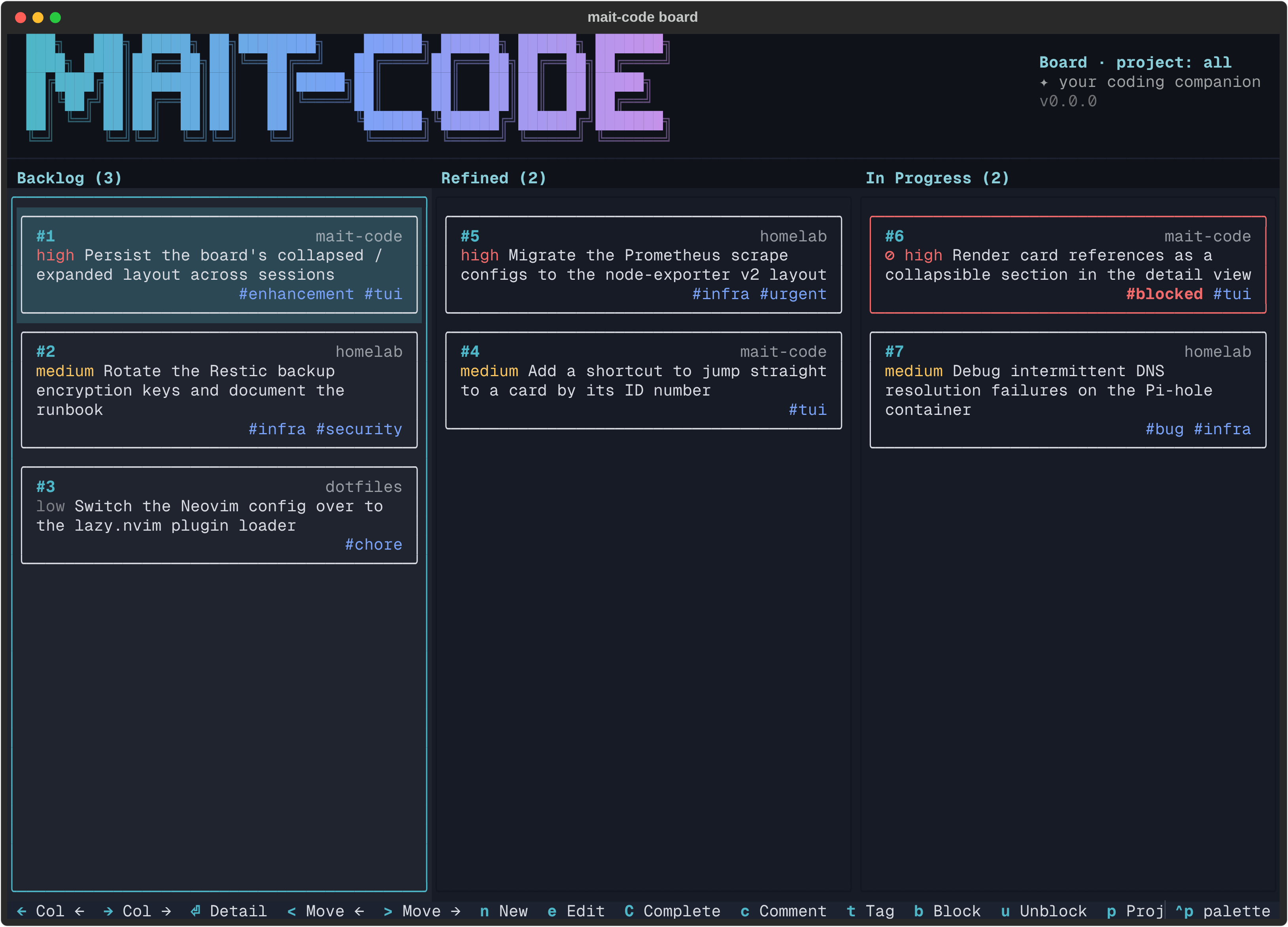
By default the board shows only the live columns — Backlog, Refined, and In Progress. This collapsed view is the working layout: it keeps the three columns you actually act on wide and uncluttered, with finished and parked work tucked out of sight so it can't pull your attention.
In Review joins them whenever a card is waiting on review, so work
waiting on a pull request never disappears from view. Press v to show it while
it's empty too.
Press d and a to reveal Done and Archived — the full six-column view:
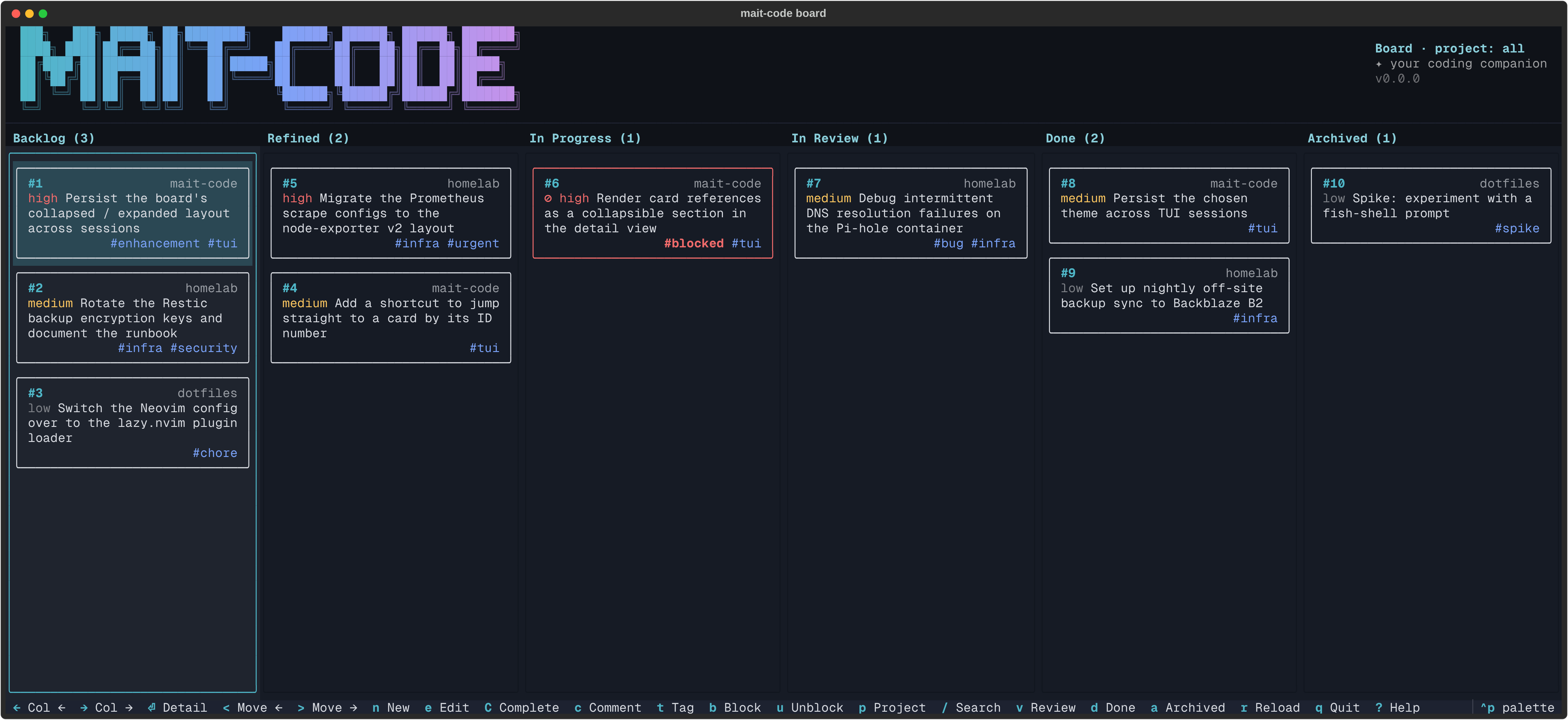
This expanded layout is for admin and reflection, not for getting work done:
reviewing what's shipped, re-reading completion summaries, sweeping stale cards
into the archive, and taking stock of how much has moved. Step back into it when
you want the whole picture; collapse it again (d, a) when you want to get back
to the flow.
Two ways in
There are two ways to drive the board, and they share the same store — changes in one show up in the other.
The TUI
Open the interactive board with:
This is a full-screen Textual app: arrow keys
to move around, single-key shortcuts to act on cards, Ctrl+P for the command
palette, and live theming. It's the best way to see the state of your work at a
glance and to do bulk triage by hand.
When you're not on a terminal that supports it (e.g. piping output, or in CI),
mait-code board falls back to a read-only text render of every project's board.
The conversation
The more transformative path is to drive the board through Claude. Just talk:
- "What's on the board?" — Claude shows you the current cards.
- "Refine card 12." — Claude drafts a description and acceptance criteria, shows them to you for approval, then moves the card to Refined.
- "Pick up the next refined card." — Claude claims the highest-priority refined card, moves it to In Progress, reads its acceptance criteria, and gets to work — all in the same session.
- "Continue card 12." — in a fresh session, Claude binds itself to a card that's already In Progress (see parallel sessions) and carries on.
- "That's done." — Claude completes the card with a summary of what changed.
This is the loop that replaces up-front planning: refine just-in-time, pick up, build, complete, repeat.
A session, end to end
A typical board-driven session looks like this:
- Capture. Something occurs to you mid-task — "the toast colours wash out on the ember theme." You say so; Claude offers to add a card, you confirm, and it lands in Backlog. You don't break your flow to act on it.
- Refine. Later, you're ready to tackle it: "refine the toast-contrast card." Claude drafts a description and acceptance criteria and shows them to you. You tweak the criteria, approve, and the card moves to Refined.
- Pick up. "Take the next refined card." Claude claims it — moving it to In Progress — reads the acceptance criteria you both agreed on, and starts implementing against them.
- Track. As work progresses, comments and references accrue on the card: a
link to the PR, a note about a tricky edge case. If something stalls, "block
it — waiting on the upstream fix" tags it
blockedin place. - Review. When the work is up as a pull request: "park it in review, PR is #42." The card moves to In Review with the PR attached as a reference, so the board shows it as finished but not merged.
- Complete. Once it merges: "complete it, summary: re-derived chip colours from the theme palette." The card moves to Done, stamped with the time and the handoff summary.
The acceptance criteria written at step 2 are the contract for steps 3 to 6 — which is exactly why refining before picking up is worth the small ceremony.
Parallel sessions
You may well run several Claude Code sessions against one project at once: two cards being built side by side, plus a third session that's only poking at a bug. In Progress then holds more than any one session is doing, so each In Progress card also records which sessions are working on it.
- Binding is automatic. Moving a card into In Progress from inside a
session (picking up the next card, or
move N in_progress) binds it to that session. "Continue card 12" in a new session runsbind 12. A card can carry several sessions; a session with nothing bound (the bug-poking one) simply has none. - Release is automatic too. A card leaving In Progress (review, complete, archive, any move out) drops all its bindings.
- Bindings stay honest. Each records the Claude Code process serving the
session, and only counts while that process is alive, so a closed session
drops out without any clean-up. A resumed session keeps its binding, and so
does a
/clear: the session-start hook moves the binding to the new session. - "The card I'm on" is
mc-tool-board list --mine, across every project.showlists a card's sessions, and each session's start-up context names its cards.
Bindings rely on the CLAUDE_CODE_SESSION_ID and CLAUDE_PID variables Claude
Code exports to its tools and hooks. Outside Claude Code, nothing binds and the
board behaves exactly as before.
Anatomy of a card
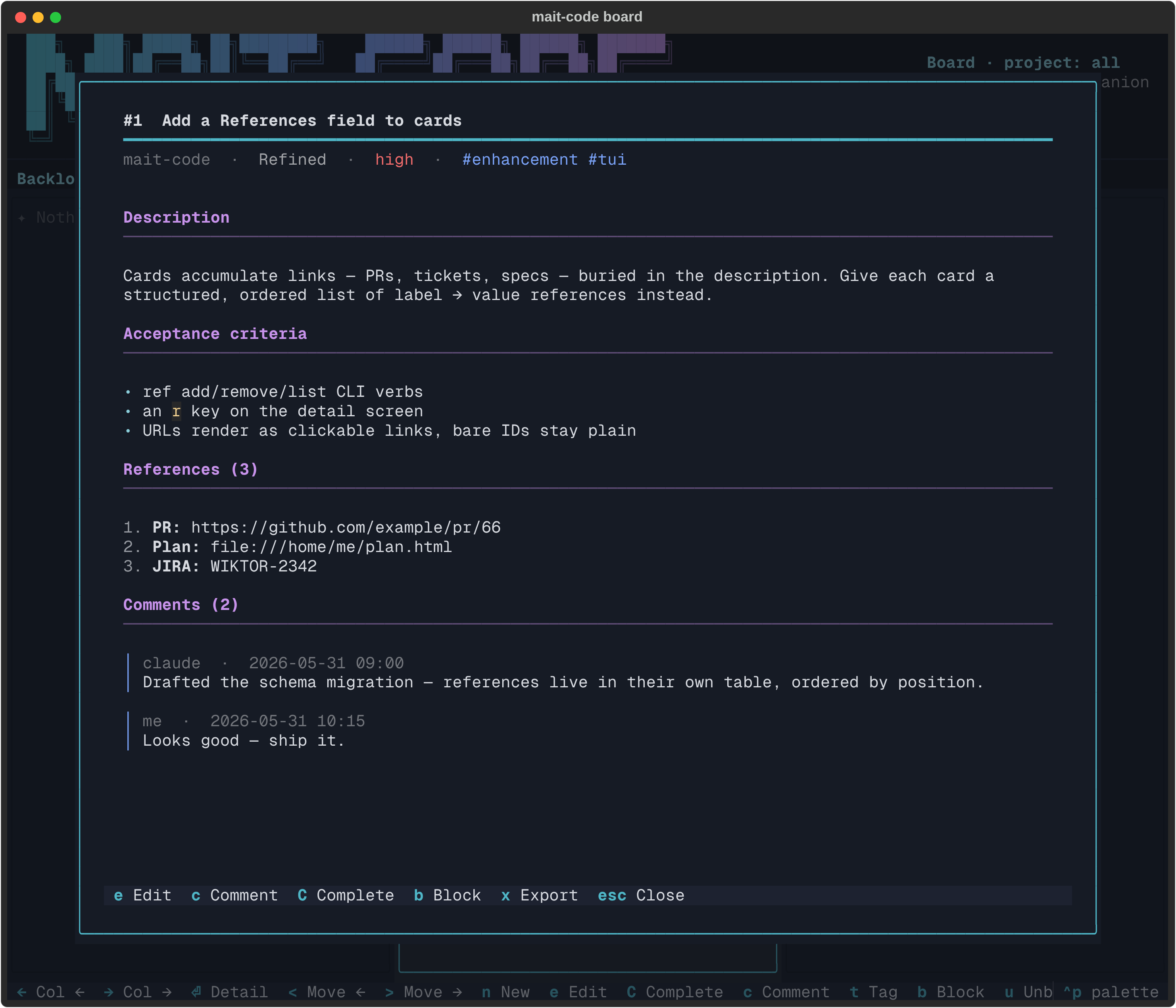
The title and the meta line beneath it (project · status · priority · tags) are pinned above the scroll: as you page through a long description, acceptance criteria and comment thread, they stay put — a constant reference to which card you're reading.
Every card carries:
| Field | Notes |
|---|---|
| Title | Required. The one-line summary. |
| Project | Required. Which repo (or idea) the card belongs to. Change it later with edit --project or the TUI edit form. |
| Priority | low, medium (default), or high. Drives pick-up order. |
| Description | The "what and why". Renders markdown, and plain text works just as well. |
| Acceptance criteria | The contract for done, usually set when refining. Renders markdown too. |
| References | An ordered list of label → value links — a PR, a ticket, a file, a spec. Kept out of the description so they stay tidy and clickable. |
| Tags | Free-form labels that ride alongside status (blocked, urgent, …). |
| Comments | A threaded log — your notes and Claude's, each timestamped. |
| Sessions | Only on In Progress cards: the live Claude Code sessions working on it (see parallel sessions). Listed by show and in --json output; left out of exports. |
| Created by | Only on cards raised through the remote API: the client that created it, shown as via <client> on the meta line and as created by: in show. Locally created cards have none. |
| Completion summary | The handoff note recorded when the card reaches Done. Renders markdown. |
References deserve a mention: they're a recent addition for keeping a card's
links structured rather than buried in prose. A value that looks like a URL
(https://…, file://…) renders as a clickable link in the TUI; a bare
identifier like JIRA-2342 stays as plain text. Manage them in a card's edit
form (press e on the detail screen), or with the ref CLI commands.
Markdown in the body
The three free-text body fields — Description, Acceptance criteria and
Completion summary — render markdown in the detail view. Headings, emphasis,
bullet and ordered lists (including nested ones), blockquotes, tables, inline
code and fenced code blocks (with syntax highlighting) all display formatted
rather than as raw #, ** and -:
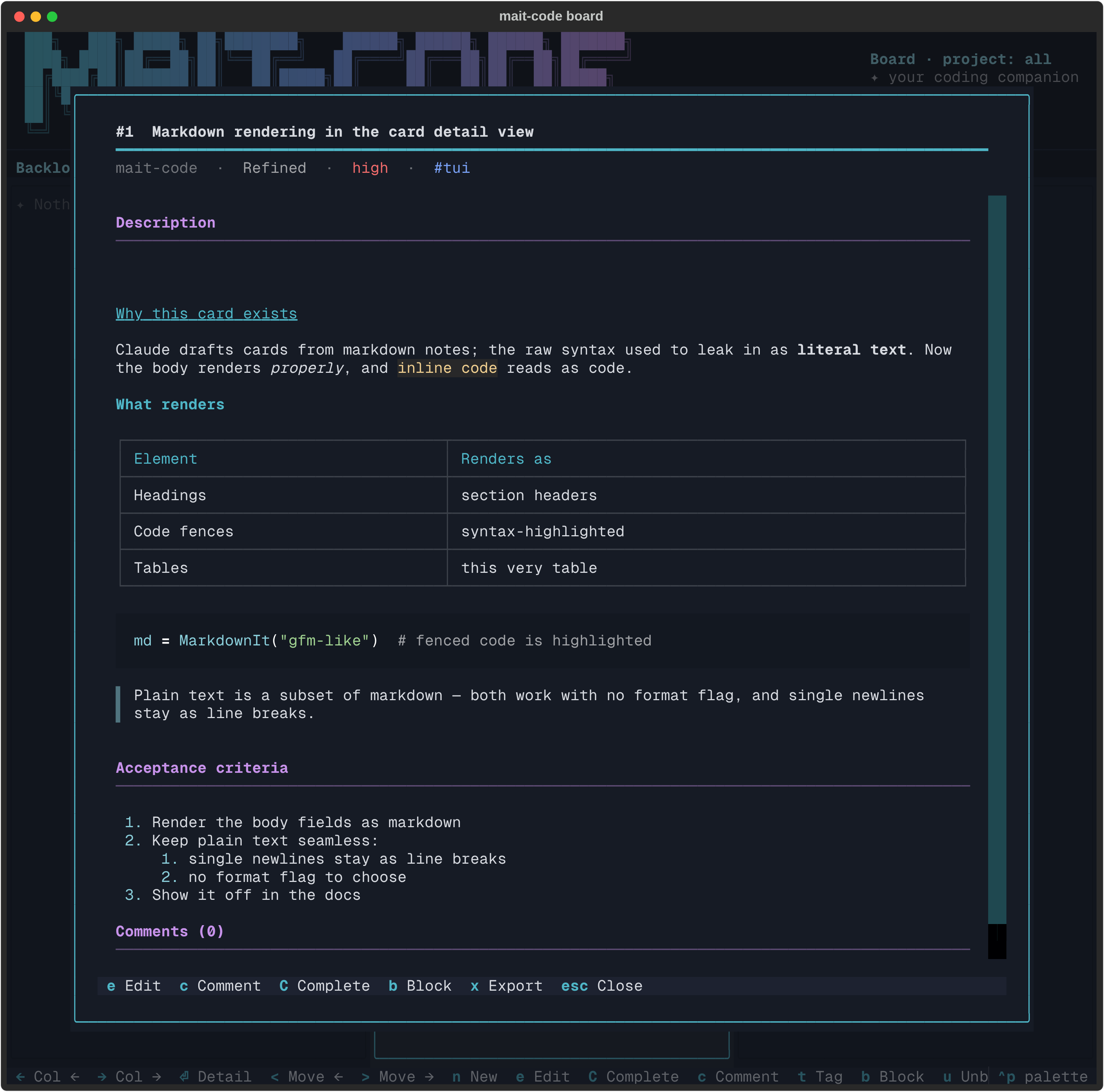
The key thing is that there's no format to choose. Plain text and markdown share the same field, and both render correctly — because plain text is valid markdown. Single newlines are kept as line breaks, so a plain list of notes lays out the way you typed it instead of reflowing into one paragraph. You can paste a markdown doc Claude drafted, or jot a few plain lines, and either reads right. The edit form (e) takes the raw text either way — what you type is what's stored; the formatting only appears in the view.
Links in the body ([label](url)) render as styled text but aren't clickable —
References stays the one place for links you can follow.
TUI reference
Board view
| Key | Action |
|---|---|
| ← / → | Focus the previous / next column |
| ↑ / ↓ | Highlight the previous / next card |
| 1–6 | Jump straight to the nth visible column (hidden columns are skipped, so the numbers shift as In Review, Done and Archived come and go) |
| Enter | Open the highlighted card's detail screen |
| n | New card (the project is pre-filled from the active filter, else left for you to choose) |
| e | Edit the highlighted card |
| c | Add a comment |
| C | Complete the card (prompts for a summary) |
| t | Add / remove a tag |
| b / u | Block / unblock |
| < / > | Move the card left / right through the flow |
| p | Filter by project (dropdown picker) |
| / | Search cards by title |
| v | Toggle the In Review column (it stays visible while it holds cards) |
| d | Toggle the Done column |
| a | Toggle the Archived pane |
| r | Reload the board from disk (it also reloads on its own when the store changes underneath it) |
| Ctrl+P | Command palette (incl. theme switching) |
| ? | Key cheat-sheet |
| q / Esc | Quit |
Card detail screen
| Key | Action |
|---|---|
| e | Enter edit mode |
| Ctrl+S | Save changes (in edit mode) |
| Esc | Close the screen / cancel an edit |
| c | Add a comment |
| C | Complete the card |
| b / u | Block / unblock |
| x | Export the card to markdown (prompts for the path, pre-filled with card-N.md in your home directory, then in whichever directory you last exported to) |
The edit form (e) is the single place a card is changed: title,
project, priority, status, tags, references, description and
acceptance criteria all live on one form. The project field completes known
project names as you type (→ accepts) and takes a new one just as
well; moving a card out of the active project filter drops it from the board,
with a toast naming where it went. Tags, references and status are a working copy —
Save (Ctrl+S) applies them all at once, and Esc
discards every pending change. Block / unblock stay outside the form (they carry
a reason comment a plain tag can't), so the form's tag editor leaves the
blocked tag alone.
!!! tip "Theming"ee4bf0f2-4c30-466e-beb1-3f25a4712432
The board ships several house themes (mait-dark, mait-ember,
mait-aurora, mait-bubblegum, mait-syntax) plus Textual's built-ins.
Switch via Ctrl+P → search theme. Your choice
persists across sessions.
CLI reference
The TUI is a front-end over the mc-tool-board command, which you (or Claude)
can call directly. The same store backs both.
# View
mc-tool-board list [--all] [--status STATUS] [--archived] [--search TEXT] [--mine | --session ID] [--json]
mc-tool-board show ID [--json]
mc-tool-board summary [--all] [--project PROJECT] [--json [--session ID]]   # --session adds bound/in-review cards + inbox count

# Create & edit
mc-tool-board add "<title>" [--description ...] [--priority low|medium|high] [--project ...] [--json]
mc-tool-board edit ID [--title ...] [--description ...] [--priority ...] [--acceptance ...] [--project ...] [--json]
mc-tool-board comment ID "<note>" [--author me|claude] [--json]

# Flow
mc-tool-board refine ID [--description ...] [--acceptance ...] [--json]   # → refined
mc-tool-board next [--project ...] [--claim] [--json]                     # top refined card; --claim → in_progress
mc-tool-board review ID [--pr <url>] [--json]                             # → in_review; --pr adds a PR reference
mc-tool-board complete ID --summary "<what was done>" [--json]            # → done
mc-tool-board move ID <backlog|refined|in_progress|in_review|done|archived> [--json]
mc-tool-board archive ID [--json]                                         # hide without deleting
mc-tool-board remove ID [--json]                                          # permanent delete

# Sessions (In Progress cards; defaults come from $CLAUDE_CODE_SESSION_ID / $CLAUDE_PID)
mc-tool-board bind ID [--session ID --pid PID] [--json]                  # bind a session (--session needs --pid)
mc-tool-board unbind ID [--session ID] [--json]                           # drop a session's binding

# Tags & blocking
mc-tool-board tag ID <tag> [--json]      /  mc-tool-board untag ID <tag> [--json]
mc-tool-board block ID "<reason>" [--json]  /  mc-tool-board unblock ID [--json]

# References
mc-tool-board ref add ID <label> <value> [--json]
mc-tool-board ref remove ID <position> [--json]
mc-tool-board ref list ID [--json]

# Export
mc-tool-board export ID [--format markdown|json] [--out FILE]    # one card, full fidelity
mc-tool-board export [--format ...] [--out FILE] \
    [--all | --project ...] [--status STATUS] [--archived] [--search TEXT]   # whole board
--json gives machine-readable output everywhere — handy for scripting or for
Claude to consume. On the read commands it emits what they list; on mutating
commands it emits the affected card after the mutation (the show --json
shape, comments included), so e.g. add --json hands a script the new card's
id without parsing prose. remove --json emits the card as it was before
deletion.
export renders a card — or a whole board listing, grouped by column — as a
portable document. Markdown embeds the stored description, acceptance criteria
and completion summary verbatim, so what you wrote round-trips unchanged; JSON
is full fidelity (tags, references and comments included, matching the
show --json shape, minus live session bindings). Output goes to stdout unless --out FILE is given. The
board-wide form takes the same filters as list.
Tips for getting the most from it
- Capture freely, refine sparingly. Backlog is cheap; a card you'll never act on costs nothing. Only spend effort refining when you're about to do the work — that's the whole point of deferring the plan.
- Write acceptance criteria you'd accept. They're the contract Claude builds against and the bar for completion. Vague criteria, vague results.
- Let Claude claim the next card.
pick up the next refined cardrespects priority then age, so the board decides what's most important — you don't have to. - Use references, not description links. A
PR → https://…reference stays clickable and structured; the same URL pasted into the description is just text. - Complete with a real summary. The handoff note is what makes Done a record rather than a graveyard — future-you (and Claude) will read it.
- Block in place. When work stalls, block it rather than dragging it back to Backlog. You keep the context of where it was and why it stopped.