The settings editor
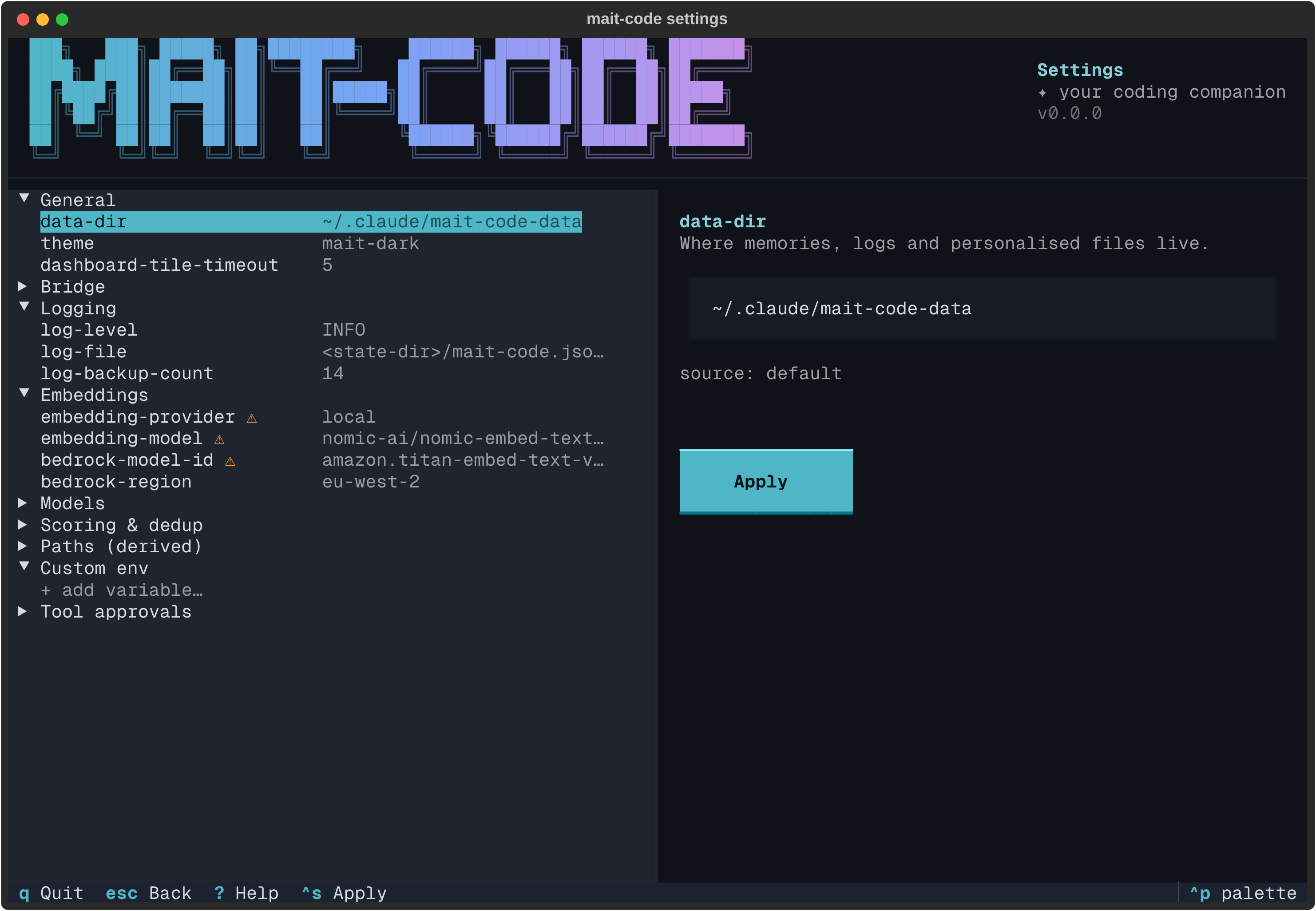
Everything mait-code reads — where your data lives, which theme the TUIs wear,
which embedding provider powers memory search, how retrieval is scored — is a
setting. mait-code settings is the full-screen editor for all of it: a
master–detail app that shows every knob, what it's currently set to and where
that value came from, and lets you change it with the right control for its
type, validated before it's written.
Why it exists
Configuration that lives only in environment variables and a hand-edited file is
easy to get wrong and hard to reason about: you can never quite tell whether a
value is the default, something you set last month, or a shell export shadowing
both. The editor makes the whole picture legible. Every row carries its resolved
value and its source — default, settings (the file), env, or derived
— so "why is it this?" is answered on screen. And because each setting knows
its own type, choices and validator, the editor can offer a radio set where the
value is an enum, reject a bad number before it's saved, and refuse to leave the
scoring weights in a state that doesn't add up.
It is the same configuration the mait-code settings CLI subcommands read and
write — the editor is just the interactive face of it. Nothing here is hidden
from settings list/get/set, and vice versa.
The layout
Three regions, top to bottom:
- The masthead — the shared brand banner, labelled Settings (see the home hub guide for how the banner works).
- The body — the settings list on the left, grouped into categories; the editor on the right, which adapts to whatever setting is highlighted.
- The footer — the live key hints.
Each row in the list reads <key> <value>. Values at their built-in default are
dimmed, so what you've actually changed stands out. A ⚠ marks a
migration-sensitive setting — one whose change triggers a re-embed (more on
that below).
The categories:
| Category | What's in it |
|---|---|
| General | data-dir (where everything lives), theme, and dashboard-tile-timeout — how many seconds a start-page shell tile may run before it's cut off (default 5). |
| Bridge | Whether the Bridge is enabled, and which channel it uses. (The channel's server/topics/token live in the Bridge screen, not here.) |
| Companion mod | Whether the companion mod is enabled, and its status bar's style (blocks or slim). Applies to new Claude Code sessions. |
| Logging | Log level, log file, and how many rotated backups to keep. |
| Embeddings | The provider (local or bedrock), the model, and the Bedrock model id / region. |
| Models | The extraction and reflection models, LLM and git timeouts, and reflection batch/novelty tuning. |
| Scoring & dedup | The retrieval scoring weights and decay half-lives, the dedup similarity thresholds and scope boosts, and the review-resurfacing threshold and importance floor. |
| Paths (derived) | Read-only values the editor computes rather than stores — the database files, the model cache, the observations directory, and the Bridge / project-alias / dashboard config paths, all from data-dir; plus embedding-dim, derived from the provider and model. |
| Custom env | Arbitrary environment variables injected at startup — covered below. |
| Tool approvals | Curated Claude Code permission rules you can opt into, so the safe commands stop prompting — covered below. |
General, Logging, Embeddings and Custom env open on boot; the more advanced groups start collapsed to keep the initial list short.
Editing a setting
Move the highlight with the arrow keys; the editor on the right re-renders for whatever you land on. The control matches the setting's type:
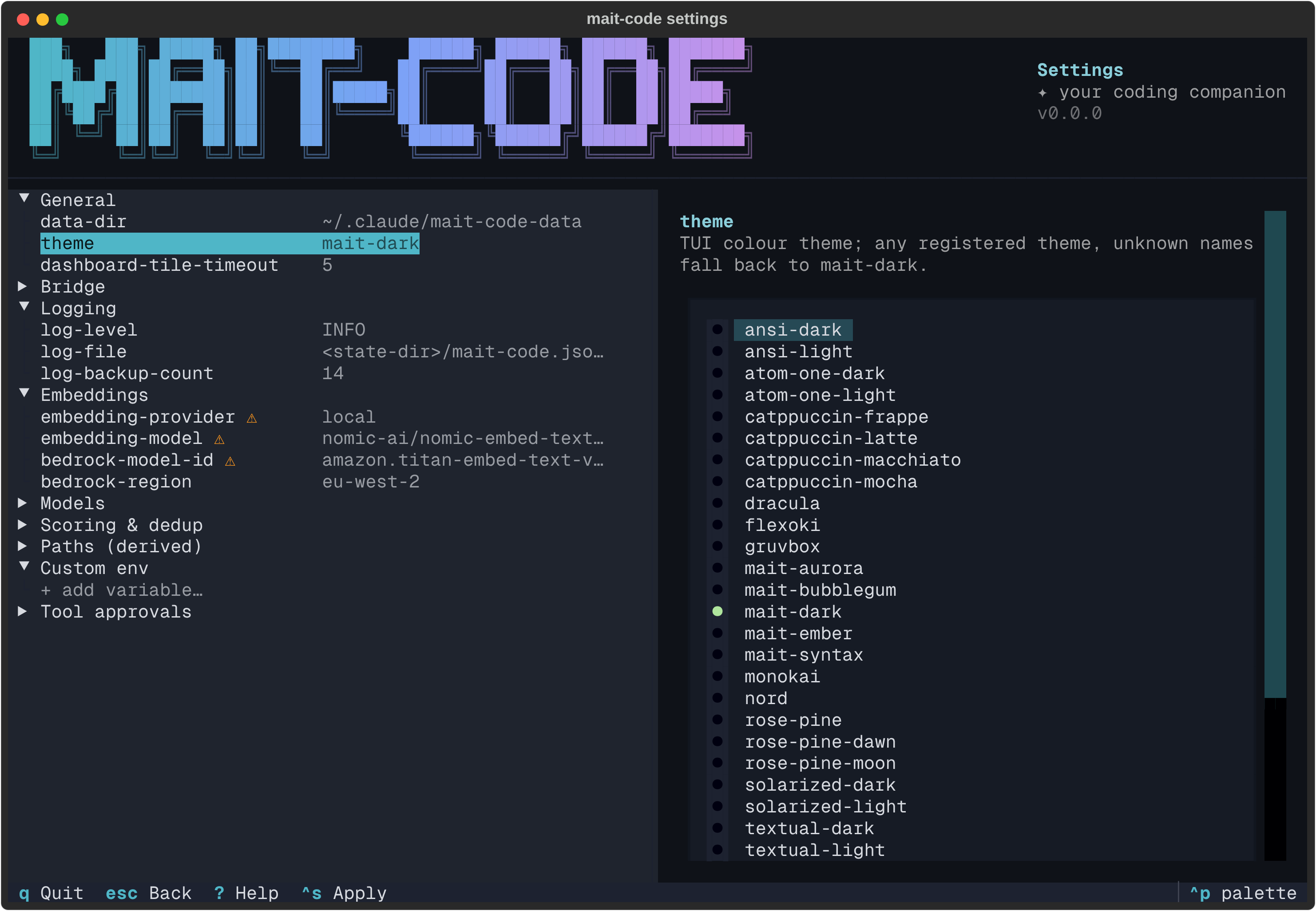
- Enums (
theme,embedding-provider,log-level, …) become a radio set of the allowed choices, the current one selected — no way to type an invalid value. - Free text and numbers (
data-dir,log-file, timeouts, thresholds …) become an input with live validation: a bad value shows its error as you type, and Apply won't write it. - Derived values (everything under Paths) are read-only — they're
computed from other settings rather than stored, so the editor shows the value
and says so rather than pretending you can change it. Most follow
data-dir;embedding-dimfollows the provider and model.
Press Ctrl+S (or Enter in an input) to apply. A line under the editor
confirms ✓ applied, along with any warning the change carries.
The scoring weights
Retrieval ranks memories by a blend of recency, importance and relevance, and
those three weights must sum to 1.0. Editing them one at a time would
inevitably pass through invalid states, so they collapse into a single
grouped row. Its editor is a small modal with all three fields and a running
sum; Apply only lights up when they total 1.0. (The settings set CLI
rejects the individual weight keys for the same reason — change them here, or
edit settings.toml directly and let doctor validate the result.)
Migrations and data-dir
A few changes have consequences beyond the file, and the editor confirms them in a modal before doing anything:
- Changing the embedding provider or model (the
⚠rows) means stored vectors no longer match — so it offers to re-embed every memory now. If you say yes, the editor drops out to the terminal soreindexcan print its normal progress, then returns. - Changing
data-diroffers to move your existing data to the new location rather than leaving it stranded.
Decline either and the setting still changes — the follow-up just waits until you run it yourself.
Where settings live
Resolution order, highest priority first:
- an environment variable (
MAIT_CODE_*) — sourceenv, - the settings file — source
settings, - the built-in default — source
default.
The file is settings.toml under $XDG_CONFIG_HOME/mait-code/ (i.e.
~/.config/mait-code/settings.toml unless XDG_CONFIG_HOME is set). The editor
writes it for you, fully commented: primary knobs uncommented, advanced ones
commented-out until you opt in, and the derived paths shown as informational
comments you can't assign. Derived values are computed, never read from the file.
An export can shadow the file
Because env wins, a MAIT_CODE_* exported in your shell overrides whatever
the editor writes. If a change doesn't seem to take, check your environment —
the settings list view names the source of every value, so a stray export
shows up as env.
Custom environment variables — the [env] table
Some tools need environment variables that aren't mait-code settings at all —
the classic case is AWS_PROFILE for Bedrock embeddings. Inside a Claude Code
session the env block of ~/.claude/settings.json supplies it, but a
standalone mait-code doctor --fix or mc-tool-memory reindex would need a
manual prefix on every invocation.
Instead, declare them once in an [env] table at the end of settings.toml:
Every mait-code entry point — the mait-code CLI and TUIs, the mc-tool-*
tools, the mc-hook-* hooks — injects these into its environment at startup.
The rules:
- The real environment wins. A variable already set in your shell is left
alone, so a one-off
AWS_PROFILE=other mc-tool-memory …override still works. MAIT_CODE_*keys are not allowed. Those are first-class settings with their own resolution order;[env]entries with that prefix are ignored at startup anddoctorwarns about them.- The table survives rewrites.
settings set, the interactive editor and install/update all carry it over untouched.
Managing them
You don't have to edit the file by hand (though that works too):
- Interactive editor — the Custom env group lists every variable; pick one to change its value or remove it, or use the + add variable… row to create one. Names are validated live as you type.
![The Custom env group in the settings editor: AWS_PROFILE selected with an
editable value input, a provenance line naming the [env] table as the source,
and Apply and Remove buttons.](../assets/settings/settings-env.png) - CLI — address a variable as
- CLI — address a variable as env.<NAME>:
$ mait-code settings set env.AWS_PROFILE dev-bedrock
$ mait-code settings get env.AWS_PROFILE
dev-bedrock   (settings)
$ mait-code settings unset env.AWS_PROFILE
settings list shows each entry as an env.<NAME> row with its provenance
(settings when the table supplies it, env when your shell shadows it).
Values whose names look secret (KEY, TOKEN, SECRET, PASSWORD,
CREDENTIAL) are masked in the list and tree views.
Tool approvals — safe permission presets
Claude Code asks for approval on every Bash call unless a rule in
permissions.allow matches it. For the genuinely safe, high-frequency
commands — git status, wc, mc-tool-board list — that's a prompt dozens of
times a session for no benefit, and it quietly trains the habit of approving
without reading.
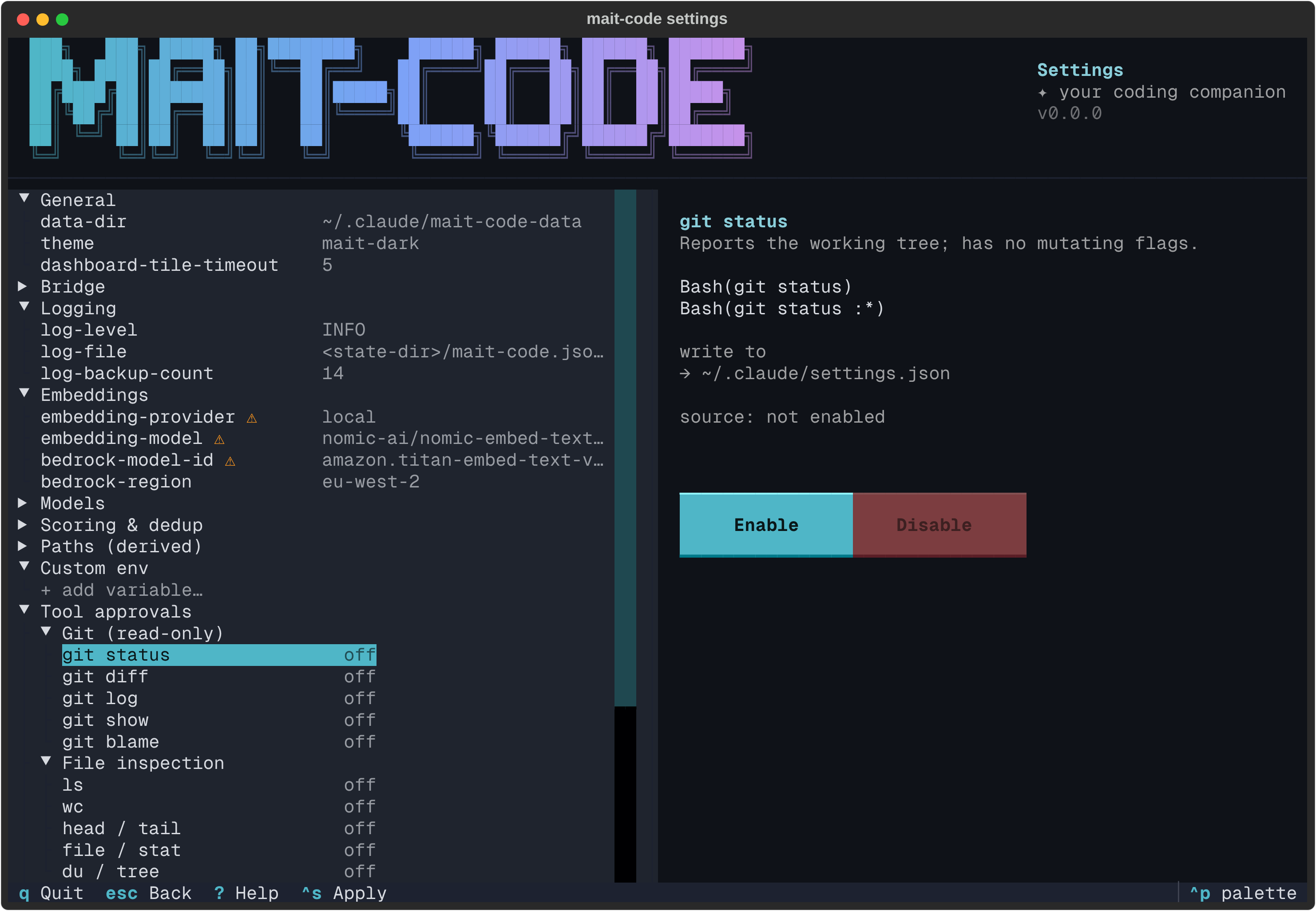
The Tool approvals group is a curated catalogue of such rules, grouped into Git (read-only), File inspection, Project tooling and mait-code tools. Nothing is on by default. Highlight a preset to see the exact rules it writes and press Enable.
One file, deliberately
Everything here reads and writes ~/.claude/settings.json — your global Claude
Code settings — so a preset you enable applies in every project. The pane names
the target file outright, and it is the same file whichever directory you
launched mait-code from.
That last part is the point. Claude Code also reads <repo>/.claude/settings.json
and <repo>/.claude/settings.local.json, and an earlier version of this editor
offered all three, picking the repo by looking at the working directory. It made
the launch directory an invisible input: the same command showed different state
and pre-selected a different target depending on which terminal you opened it
from, and from an unrelated repo it would happily target that repo's settings.
No amount of picker UI fixes an input you can't see, so the scope concept left
this surface entirely.
If you enabled presets into a project scope under 0.66.0
Claude Code still unions all three files, so a preset written into a repo's
settings then — or by hand since — remains in force while this editor
reports it off, and Disable won't reach it. Remove those rules by
editing the repo's .claude/settings*.json directly.
What's not in the catalogue
Permission patterns are prefix matches, so they can't express "this subcommand but not that flag". Anything whose safe form is distinguished only by an argument is left out rather than shipped with a caveat:
mc-tool-board next— read-only until--claim, which claims a card.mc-tool-memory entities— searches untilentities merge, which rewrites the graph.mc-tool-memory review— kept out so the read-only tier stays clear of the review write path (reviewedstamps a memory).mc-tool-inbox drainandmc-tool-reminders check, which both mutate.
A few presets are offered but flagged not read-only — uv run ruff check
(prefix matching also permits --fix), uv run ruff format and uv run
pytest. They can rewrite tracked files or run project code. That's reversible
with git, but the pane warns you before you opt in.
Weigh those against the global scope specifically. Because there is nowhere else
to put them, enabling one applies in every project you open — so uv run
pytest means any repo you clone from then on can run its own conftest.py
without prompting you. That is a wider reach than the read-only tier, and a
wider reach than the same preset had when 0.66.0 defaulted to a per-repo file.
If that's not a trade you want, leave the not-read-only presets off and approve
those commands per session.
Why every rule comes in pairs
Enable a preset and you'll see two rules written, not one — Bash(git diff) and
Bash(git diff :*) — the bare invocation and anything with arguments.
The original reason was defensive: the rules were shaped on the belief that
Claude Code matched by raw string prefix with no word boundary, which would have
let Bash(git diff:*) reach git difftool --extcmd=<anything> — an arbitrary
command per changed file — and stat reach static-sh, tail reach
tailscale, file reach file-roller.
That belief was tested against Claude Code 2.1.220 and turned out to be wrong:
:* already stops at a token boundary, so Bash(git diff:*) refuses
git difftool. None of those four escapes exist on this version.
The pair form stays regardless. It costs nothing, it says the intended boundary
out loud instead of leaning on an undocumented matcher detail, and it still
holds if a future release changes the rule. It just isn't the thing keeping a
shell out of your git diff grant.
Two other measured details are worth knowing before you write rules by hand:
Bash(cmd *), the older space form, is a real wildcard.Bash(git *)permitsgit push. It is not a safer spelling ofBash(git:*).- A grant buys unsandboxed execution, not merely a quiet prompt. An ungranted command Claude Code can contain runs in a filesystem-isolated sandbox with no prompt at all, and its writes are discarded; uncontainable ones are refused outright. So "no prompt appeared" is not evidence that a rule matched, and narrowing a grant needn't break anything that only reads.
Both are undocumented matcher behaviour pinned to 2.1.220 — see Granting allowed-tools for the full measurement.
Upgrading from before 0.68.0
Rules already in your ~/.claude/settings.json keep their older form.
Disable and re-enable a preset to rewrite it. On 2.1.220 this is tidiness
rather than a fix — the boundary the rewrite adds is one the matcher was
already applying.
Writes are surgical: your own hand-written rules keep their place and their
order, unrelated keys are preserved, and the file is backed up (once per
session, as settings.json.bak-<timestamp>) before the first change. A settings
file that isn't valid JSON is reported rather than overwritten.
Off the terminal
mait-code settings only opens the editor when it's attached to a TTY. Piped or
redirected, it falls back to the read-only settings list — a provenance-aware
table of every knob, its resolved value and its source — so scripts and CI see a
stable, parseable view instead of a TUI. The fallback ends with a tool-approvals
section naming the settings file and listing the presets you have enabled, and
settings list --json carries the same under a tool_approvals key.
Reference
Keys
| Key | Action |
|---|---|
| ↑ / ↓ | Move between settings |
| Ctrl+S / Enter | Apply the edit (or open the grouped weights editor) |
| Esc | Back to the list (from the editor); quit (from the list) |
| q | Quit |
| ? | Key cheat-sheet |
| Ctrl+P | Command palette (incl. theme switching) |
The CLI behind it
The editor is the interactive face of the mait-code settings command. The same
store backs settings list (the read-only table), settings get <key> (one
resolved value and its source, for scripting) and settings set <key> <value>
(validate → write → run any follow-up). See the
CLI reference for the full surface and flags, and
How memory works for what the scoring and dedup knobs actually tune.